For Shopify pet stores

From pet products
to products
for your pet.

Help shoppers find the relevant part of your store for the pet they love. Petsona connects their pet's profile with guided product discovery on your existing Shopify storefront.

Your catalogue. Your theme. A little more personal.

Your pet shopInteractive example

Who are we shopping for?

Example Labrador Retriever representing Milo
Shopping for

Milo

Labrador Retriever

Picked for Milo

Dog products

Playtime ball

Made for dog play

Rope tug toy

For interactive tug

Milo is a dog. Start with the dog aisle.

Example pets and products. Photos are illustrative. Photo credits.

Pet profiles linked to customer accountsGuided product discoveryCompatible Shopify themes

RomsNRaks, with Petsona

Same store.
A more personal shop.

From browsing aisles to shopping for a particular pet. See how a familiar pet store becomes a curated experience for Milo and Luna.
BeforeThe original storefront
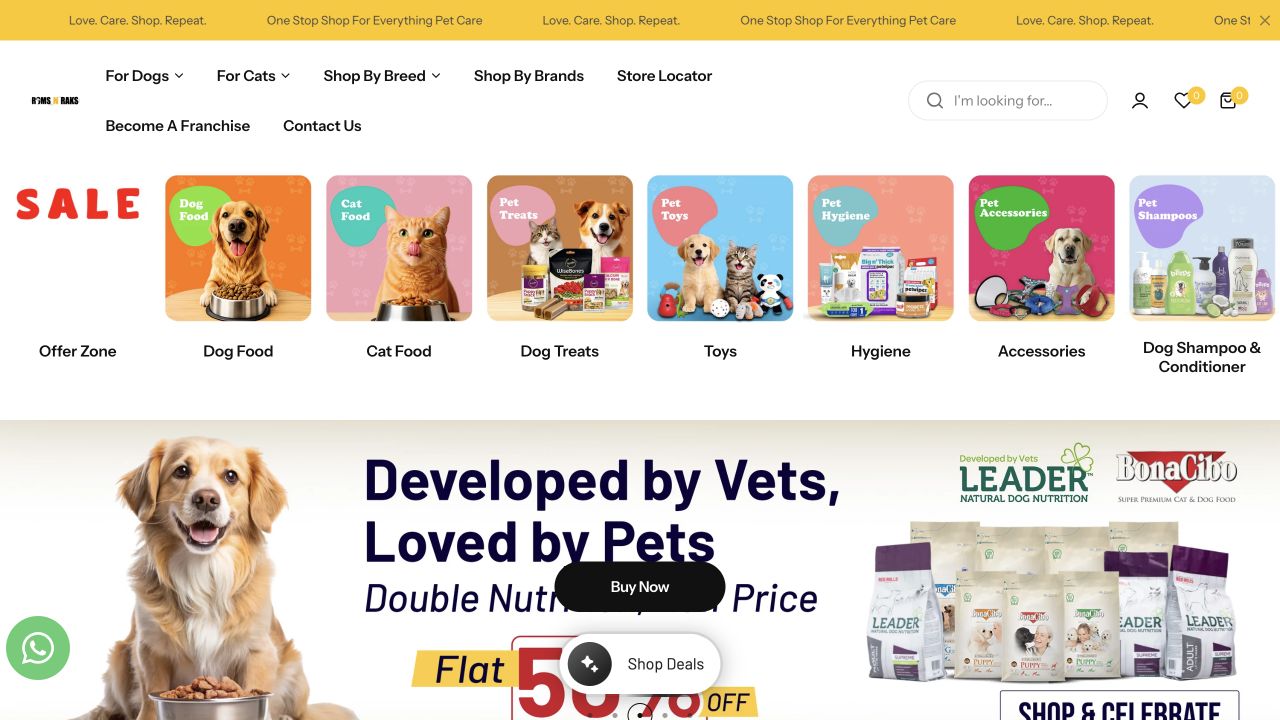
Original RomsNRaks homepage with category navigation and promotions
Browse by category, breed or brand. The shopper finds their way through the wider store.
With PetsonaA range selected for Milo
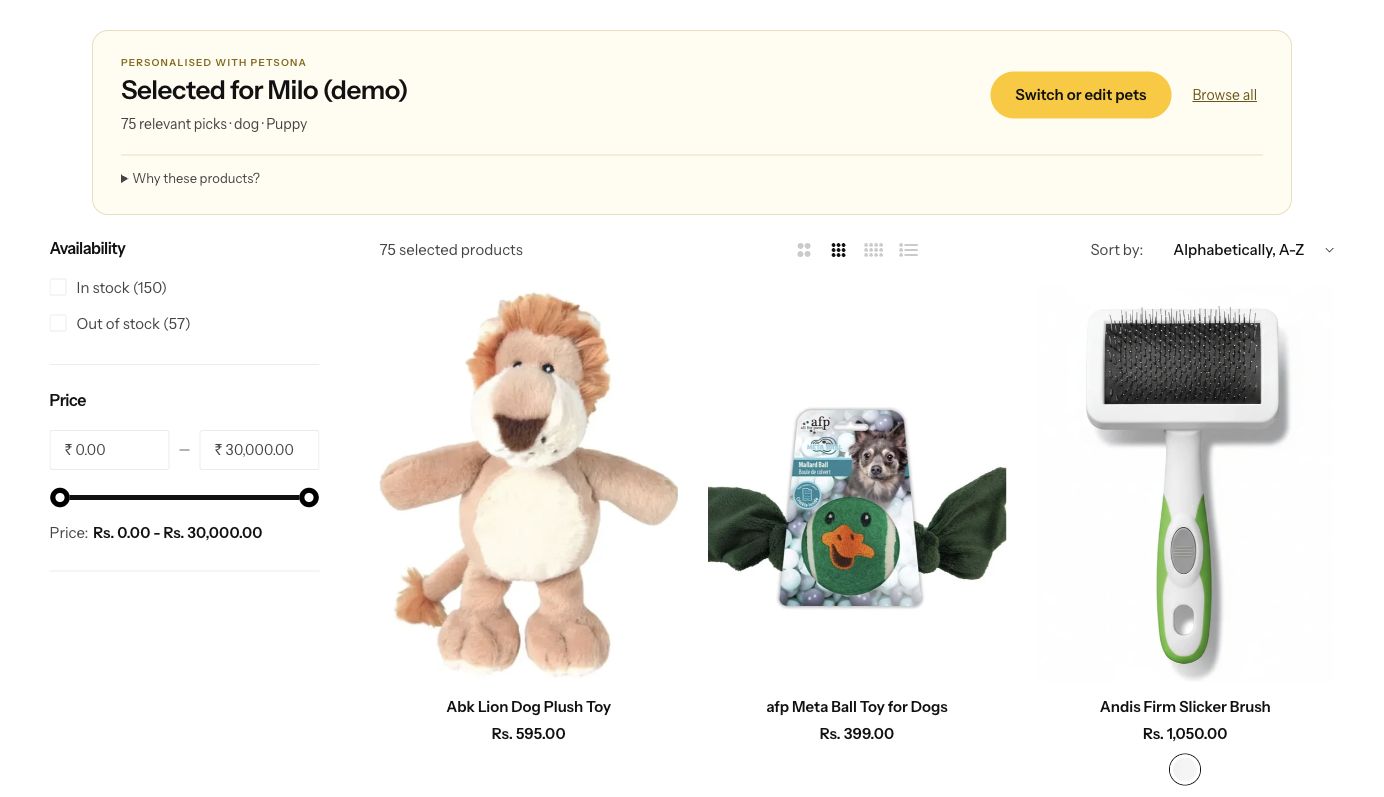
Petsona demonstration showing 75 relevant picks selected for Milo with native Shopify filters and product cards
Choose Milo and bring his relevant range into view. Switch to Luna for her cat products.

Meet the pet. Curate the range. Explain the picks.

A guided introduction, a choice of pets and product selection based on recorded catalogue attributes.

Explore the RomsNRaks demo

Independent demonstration using a separate Shopify development store and synthetic pet profiles. Captured on 4 October 2026. View the original store.

Watch the original Petsona app walkthrough 25 seconds
September 2026 test-store recording using demo products and a fictional pet. Its appearance may differ from the current app.
Open the original demo page

One clear workflow

Meet the pet.
Help them shop.

Start with a useful shopping experience, then build from what your customers actually use.

  1. 1

    Let the customer introduce their pet

    Capture the details that matter to your catalogue, such as species, life stage and size. Customers can manage more than one pet.

  2. 2

    Connect those details to your products

    Use catalogue attributes and transparent matching rules to guide the Pet Finder. Review the product information behind each match.

  3. 3

    Bring the journey into your storefront

    Add Petsona through Shopify app blocks and embeds on compatible themes. Check placement, mobile behaviour and the complete customer journey.

Built around your store

The catalogue you know.
The pets they know.

You bring the product knowledge. Your customers bring the pet details. Petsona helps connect the two.

Explore it with your catalogue

Keep your Shopify theme

Work with app blocks and embeds where your theme supports them. We will check compatibility and placement with you.

Make the product rules understandable

Begin with clear product attributes. Recommendations depend on the quality of your catalogue data, so the reasons should be open to review.

Give multi-pet households a choice

A shopper may have both Milo and Luna at home. Selecting a pet makes the shopping context clear.

Learn from the customer journey

Review profile use, Finder activity and merchant feedback. Measure changes against your store's own baseline.

Before we talk

A few useful
answers.

Have a question about your store?
Write to hello@petsona.xyz

Is Petsona for my Shopify store?
Petsona is built for pet-focused Shopify stores. The walkthrough is a chance to check your catalogue, customer journey and theme, and decide where pet-specific discovery would be useful.
Do I need to replace my theme?
Petsona uses Shopify app blocks and embeds on compatible themes. Support depends on the theme and the templates you use. We will check this with your store before suggesting an installation.
How are products matched to a pet?
The Pet Finder uses pet details and catalogue attributes, with rules you can review. Product discovery depends on accurate product information. Dietary needs and allergies require reliable ingredient evidence and the customer's own checks.
Can a customer save more than one pet?
Yes. Petsona supports multiple pets linked to the customer's account. Customers explicitly save their profiles and select which pet they are shopping for. In the RomsNRaks demonstration, device profiles stay in that browser; saving to an account is a separate action. See our privacy policy for how data is handled.
Can I see it on my own catalogue?
Book a 20-minute walkthrough and bring your store URL. We will review your products and show the current Petsona journey, then discuss which catalogue attributes and storefront placements would fit your store.
What does it cost, and how do I get started?
Start with the walkthrough. We will confirm the current plan, any applicable charges, theme compatibility and setup steps before you install. The demonstration is a chance to assess the fit for your store.
Does Petsona send marketing messages automatically?
Connecting a pet profile does not by itself send a campaign. Messaging requires a supported provider, a verified connection, the appropriate customer consent and merchant configuration. We will discuss the current integration status during the walkthrough.

Let's look at your store

What would shopping
for Luna look like?

In 20 minutes, we will review your catalogue, show the current demo and discuss a practical first step for your storefront.

Book a 20-minute walkthrough Bring your Shopify store URL.